Custom Software vs SaaS: When to Build, When to Keep Paying
Custom software vs SaaS comes down to fit, cost, and ownership. Learn when to build, when to keep buying, and how to run the numbers on your own workflow.
Most businesses never make one big decision about custom software vs SaaS. They make a hundred small ones: another subscription, another spreadsheet that bridges two tools, another person who becomes the only one who knows how the export works.
This guide is for founders and operations leads at small and mid-sized companies who suspect they've reached the edge of what off-the-shelf tools can do. It covers when SaaS is the right call, which is more often than you might expect a software studio to admit. It also covers the signs you've outgrown it, how to compare the real costs, and what a sensible middle path looks like.
What "custom software vs SaaS" actually means
SaaS (software as a service) is software you rent. Someone else builds it, hosts it, and updates it for thousands of customers at once. You get a login, a monthly bill, and the features the vendor decides to ship.
Custom software is built for one business. It follows your process, your data, and your exceptions. You own it, and someone has to keep it running.
That framing makes it sound like a binary choice. In practice it almost never is. Most working businesses end up with three layers:
- Commodity SaaS for functions that look the same everywhere: email, payroll, the accounting ledger, video calls.
- Integrations that move data between those tools so nobody retypes it.
- Custom software for the part of the business that is specific to you: how you quote, how you schedule, how work moves from sale to delivery.
So the useful question isn't "custom or SaaS?" It's "which layer does this piece of work belong in?"
When SaaS is the right answer
A software studio telling you to keep paying for SaaS may sound odd. But buying is the correct answer for a lot of business software, and a good build partner should say so.
Martin Fowler made the clearest version of this argument in a 2010 essay on utility vs strategic software. Utility functions, like payroll, work the same way at every company. For those, he argues, you should buy a package and adapt your process to fit it. Strategic functions are different: "If how you do this function is a crucial part of what makes you better than the competition, then the software that supports this function needs to be as good as you can make it."
Keep buying SaaS when:
- The process is standard. Payroll, tax filing, general ledger accounting, and email work roughly the same everywhere. A vendor with thousands of customers will do these better than a one-off build.
- Compliance is the product. Tools that track rule changes for you, like payroll tax tables, earn their fee every time a rule changes.
- Your process can bend without cost. If adapting to the tool's way of working costs you nothing meaningful, adapt.
- The vendor's roadmap points where you're going. If the features you need next are already on the way, waiting is cheaper than building.
- You're still figuring out the process. Early on, a flexible off-the-shelf tool is a cheap way to learn what you actually need. Building around a process you haven't settled is how budgets disappear.
If most of your stack fits this description, you don't have a custom software problem. You might have a configuration problem or a training problem, and those are cheaper to fix.
Signs your business has outgrown off-the-shelf software
The signal that SaaS has stopped fitting is rarely a single failure. It's friction that builds up around the edges of your tools. Watch for these:
Spreadsheets bridging your systems. A sheet holds data from the CRM, the ticketing tool, and accounting, because none of them talk to each other well enough to answer a simple question.
Double entry. The same customer, job, or order gets typed into two or three systems. Every retype is a chance for the records to drift apart.
One person who knows how it works. The export, the macro, the Friday reconciliation. If that person is out for a week, the process stops.
Exceptions handled in email. The tool covers the standard path. Everything else lives in inbox threads nobody can search later: the rush order, the special discount, the approval that needs a second look.
Paying for seats, not use. Per-seat pricing across several overlapping tools, many of which people open only to copy something out.
Constant app switching. In a study of 137 users across three Fortune 500 companies, Harvard Business Review found people toggled between apps and websites about 1,200 times a day. They spent just under four hours a week reorienting after those switches.
Your process changed to fit the tool. This is the most expensive sign, and the easiest to miss. When the team stops doing something the way customers prefer because "the system doesn't do that," the software is now setting your policy.
One or two of these is normal. When several show up around the same workflow, that workflow is a candidate for custom software.
The real cost of custom software vs SaaS
Most build vs buy comparisons put a subscription price next to a build quote and stop there. That comparison is usually wrong, in both directions.
What SaaS actually costs
The subscription is the visible part. The full cost includes:
- Licenses, multiplied by seats and years. Zylo's 2026 SaaS Management Index, drawn from more than 40 million licenses, puts median SaaS spend at $9,455 per employee. Zylo's figure is a median across the organizations it tracks, so treat it as directional for a small team.
- Unused licenses. The same report finds organizations leave an average of 36% of their SaaS licenses unused.
- Integration glue. Connector tools, middleware subscriptions, and the time spent fixing a sync when one side changes its API.
- Workaround labor. Hours spent on double entry, exports, reconciliation, and chasing information across tools. This is usually the largest number, and the one nobody budgets for.
- Price changes you don't control. Vendors reprice, move features to a higher tier, or switch to usage-based billing.
What custom software actually costs
Custom software has its own honest list:
- The build. Discovery, design, development, testing, and data migration.
- Hosting and monitoring. Servers or cloud services, backups, uptime checks, and security updates.
- Ongoing changes. Your business will change, so the software has to change with it. Budget for continued work every year, not a one-time project.
- Ownership risk. If one contractor wrote it and moved on, you own code nobody understands. That risk is real, and it belongs in the estimate.
An example from our own work
One system we built for a managed IT services firm brought quoting, CRM, service desk, marketing, and compensation into one internal platform. The work followed the approach on our about page. It started with the people doing the work: their real process, including the exceptions and workarounds a feature list misses. It was built for everyday use, and we operate what we built: hosting, monitoring, backups, and support.
The results are listed in the selected work on our homepage. Five functions now run in one platform instead of separate tools, and the firm saves more than $100,000 a year on software subscriptions. Roughly 15 hours of manual work came out of every week.
Fifteen hours a week is about 750 hours a year across 50 working weeks. That is time available for the work the firm actually sells.
Not every business will see numbers like these. A firm running five overlapping tools around one core process is a stronger candidate than a firm with one well-fitting tool and a few annoyances.
A quick way to run your own numbers
For the workflow you're questioning, write down:
- The annual subscription cost of every tool the workflow touches.
- Hours per week spent on workarounds, multiplied by a loaded hourly cost and 50 weeks.
- The annual cost of integration tools, plus the time spent maintaining them.
- The cost of errors: rework, missed billing, a customer who left.
Add those up over three years. Then compare the total against a build estimate plus three years of hosting and support. Three years matters because it captures subscription creep on one side and maintenance on the other.
A build vs buy decision framework you can run in an afternoon
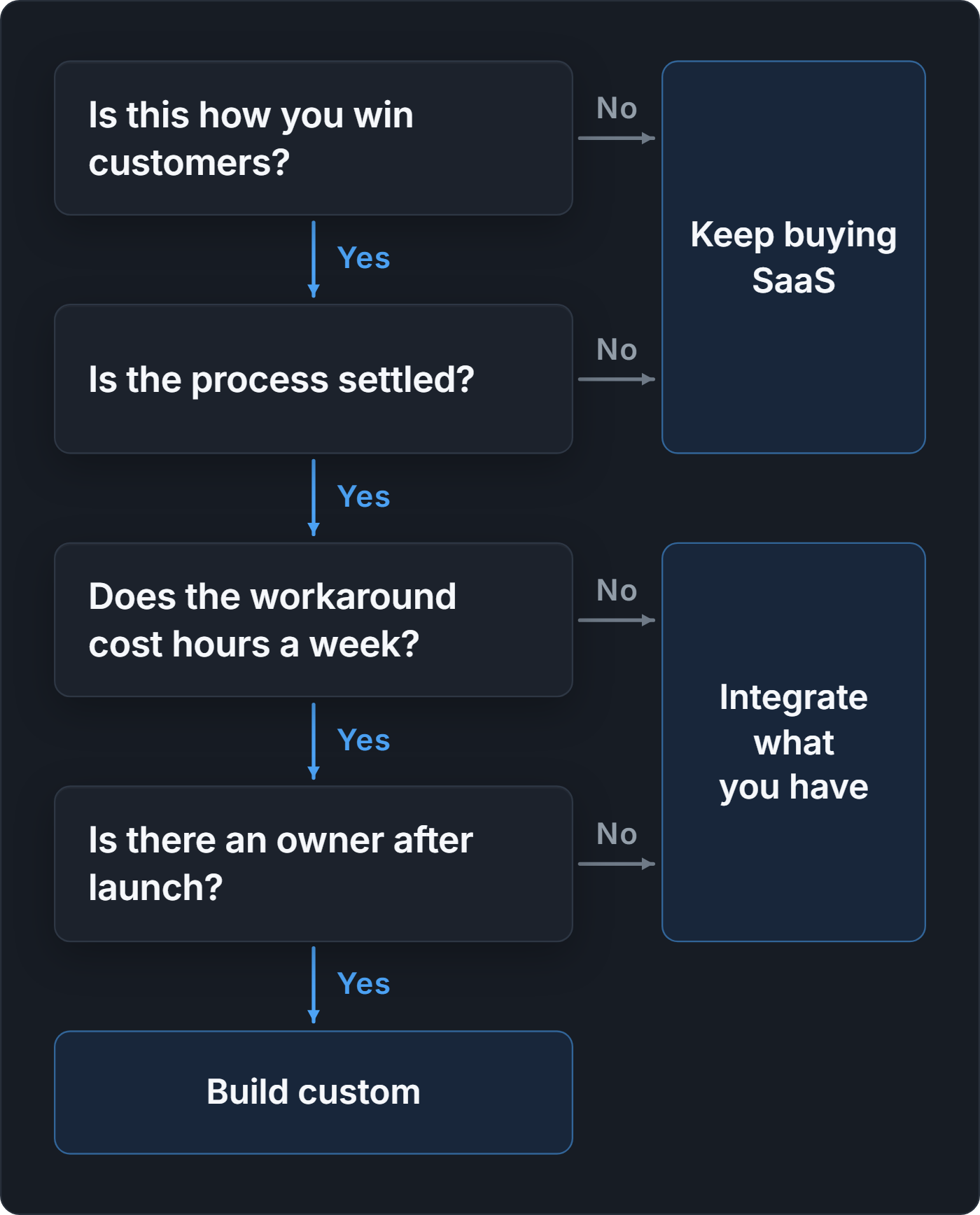
When a specific workflow is in question, score it against the questions below. You don't need a consultant for this. You need the people who do the work in the room.
| Question | Leans SaaS | Leans custom |
|---|---|---|
| Is this how you win customers? | No, it's back-office routine | Yes, it's part of what customers pay for |
| How standard is the process? | Same as everyone in your industry | Full of rules and exceptions specific to you |
| How many tools does it touch? | One | Three or more, joined by spreadsheets |
| How stable is the process? | Still changing month to month | Settled, and the tool is what's holding it back |
| What does the workaround cost? | A few minutes a week | Hours a week, or errors that cost real money |
| Who would own it after launch? | Nobody is available | A team or partner accountable for running it |
If most answers lean SaaS, stay put and tune what you have. If most lean custom, you have a candidate. If the answers are mixed, look at the middle path below.
Two answers carry extra weight. If the process still changes every month, wait, and build after it settles. And if nobody will own the software after launch, don't build it yet, however good the other answers look. Integrate the tools you already have until someone can own it.
The middle path: custom software layered over the tools you keep
For many small and mid-sized businesses, the most practical answer is a layer of custom software on top of the SaaS tools that already work.
That might look like this:
- Keep the accounting system as the ledger. Build the quoting and job workflow that feeds it clean data, so nobody retypes invoices.
- Keep the ticketing tool. Build the dashboard that joins tickets, time, and contracts into one view the team can act on.
- Keep the CRM. Build the intake form and approval flow the CRM never handled well, and sync the result back.
This keeps commodity work on commodity tools, where vendors handle updates and compliance. It puts your budget into the specific part of the business where off-the-shelf tools fall short. It also keeps the change reversible. If the custom layer stops earning its place, the systems underneath are still there.
AI belongs in the same pattern. Models can assist with classifying incoming requests, drafting replies or quotes, and searching across scattered records. They work best embedded in an operator's workflow, with a person reviewing the output before it reaches a customer or a ledger. Treat each AI step as a draft with an audit trail, not a final decision.
What to ask before you commission custom software
If the numbers and the framework point toward building, the next risk is the build itself. A few questions separate a project you'll still be glad about in three years from one you'll want to replace.
Does the work start with the real process? A good partner walks through how the work actually happens, workarounds and exceptions included, before proposing anything. A feature list written in a meeting room misses the parts that matter.
Is the first release small enough to ship early? Start with the smallest version that does real work for real users. A working system in use teaches you more than a complete specification ever will.
Will you see working software as it's built? Short build cycles with regular reviews catch misunderstandings while they're still cheap to fix.
Who owns the code and the data? You should. Get it in writing, including access to the code repository, the hosting account, and the database.
What happens after launch? Someone has to host it, monitor it, back it up, apply security updates, and make changes as the business changes. Launch is the start of using the system, not the end of the work. Get the support terms and costs in plain language before you sign.
Is the technology proven? Mainstream frameworks and databases, such as Laravel, .NET, and PostgreSQL, are easier to hire for and maintain than whatever was fashionable last quarter.
Our about page covers how we work, from starting with the people doing the work to operating the system after launch.
Frequently asked questions
Is custom software more expensive than SaaS?
Up front, almost always. Over three to five years, it depends on the workflow. When one custom platform replaces several overlapping subscriptions and removes hours of weekly manual work, it can cost less than the tools it replaces. When it replaces one well-priced tool that fits, it usually costs more.
How long does it take to build custom business software?
Scope drives the timeline more than anything else. A focused first version that handles one core workflow is a much smaller project than a full platform, and it can be in use while later stages are still being planned. Ask any builder for a staged plan with an early working release, rather than a single delivery date a year out.
Can custom software integrate with the SaaS tools we already use?
In most cases, yes. Common tools for accounting, CRM, ticketing, and commerce offer APIs that a custom system can read from and write to. Keeping those tools and building a connected layer on top is often the most cost-effective option.
When should a small business switch from SaaS to custom software?
When a core workflow touches several tools held together by spreadsheets, costs hours of manual work every week, and has settled enough that you know what it should do. If the process is still changing quickly, stay on flexible off-the-shelf tools a little longer.
Who maintains custom software after it launches?
Whoever you agree on before you sign: your own team, or the partner who built it. Either way, hosting, monitoring, backups, security updates, and change requests need a named owner and a budget.
Start with one workflow
You don't need a software strategy to make progress here. Pick the one workflow that generates the most spreadsheets, retyping, and "ask the one person who knows how it works." Map it, run the numbers above, and see where it lands.
If it lands on custom, or somewhere in the middle, tell us what you're working on. Walk us through the process and the tools involved, and we'll help you work out the next practical step, even if that step is keeping the software you already have.